
AliExpress Shopping Assistant
Overview
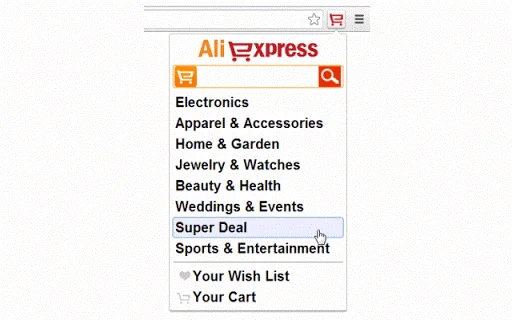
The AliExpress Shopping Assistant is a compact browser extension designed to streamline the shopping experience on AliExpress.com. It provides users with a convenient button interface that enhances navigation and product discovery directly within the browser. This tool is ideal for individuals who frequently shop on AliExpress and seek faster access to specific items or pages without manual searching. The assistant aims to reduce time spent browsing by offering quick search capabilities and direct routing to desired sections of the site.
Target users include online shoppers, bargain hunters, and those managing multiple purchases or comparing products across categories. The tool is particularly useful for users who need to access specific product listings, track deals, or navigate complex site structures efficiently. While the developer, AliExpress, is known for its e-commerce platform, no additional details about the development team or company background were provided beyond the name.
Real-world usage scenarios include searching for trending products during seasonal sales, finding a specific item after a previous visit, or quickly returning to a previously viewed category. The assistant operates as a lightweight addition to the browser, designed to integrate seamlessly into existing workflows without disrupting the browsing experience.
Key Features & Capabilities
- Quick Search Integration – Enables instant product searches directly from the browser toolbar, eliminating the need to navigate to the main search bar on AliExpress.com.
- Direct Navigation – Allows users to jump to specific pages such as categories, deals sections, or personal account areas with a single click.
- Compact Design – The button interface is small and unobtrusive, minimizing screen space usage while remaining easily accessible.
- Browser-Based Operation – Functions entirely within the browser environment, requiring no external software or installation beyond the extension.
- Seamless Integration – Works with the AliExpress website without requiring changes to user habits or additional login steps.
For example, a user can click the button and type “wireless headphones” to instantly see relevant results. Another scenario involves returning to the “Flash Sales” section without retracing navigation steps. The assistant supports efficient workflows by reducing repetitive actions, especially for frequent shoppers managing multiple product comparisons or purchase histories.
User Interface, Workflow & Performance
The user interface is minimalistic, featuring a single button placed in the browser’s toolbar. This design prioritizes simplicity and quick access. Navigation is straightforward: clicking the button opens a small input field where users can enter search terms or page names. The workflow is linear and intuitive, requiring no learning curve for basic use.
Performance is expected to be efficient given the tool’s lightweight nature. The extension operates within the browser’s environment, relying on existing web technologies. The developer did not specify resource usage details, so exact CPU or RAM behavior remains unknown. However, based on general software behavior patterns, such extensions typically have low impact on system performance.
Stability is assumed to be consistent with standard browser extensions, though no specific information about crashes or errors was provided. The tool does not require background processes or continuous updates during use, which contributes to a smooth user experience. Overall, the workflow is optimized for speed and ease, making it suitable for users who value efficiency over advanced customization.
Compatibility & System Requirements
The AliExpress Shopping Assistant is compatible with both Windows and Mac operating systems. It is designed to work with major web browsers that support extensions, though specific browser names were not listed. The software version is 1.0, and the installation size is 2.1 MB, indicating a lightweight footprint.
Exact system requirements were not listed. Compatibility information was partially provided, focusing on OS support. No hardware specifications such as minimum RAM or processor speed were included. The developer did not provide additional details about required browser versions or plugin dependencies.
Users should ensure their system meets standard browser extension requirements, which typically include a modern web browser and stable internet connectivity. The extension is intended for desktop use and does not support mobile platforms.
Pros and Cons
Pros
- Lightweight at just 2.1 MB
- Free to download and use
- Simple, intuitive interface
- Direct access to AliExpress content
- Enhances browsing efficiency
Cons
- No advanced filtering or comparison tools
- Limited to AliExpress.com functionality
- No offline mode available
- Dependent on browser extension support
- Minimal customization options
FAQ Section
Is the AliExpress Shopping Assistant compatible with my browser?
The extension is designed for use with major web browsers on Windows and Mac. Specific browser compatibility was not detailed, but it is expected to work with standard platforms like Chrome, Firefox, and Safari.
Is the tool safe to use?
As a browser extension developed by AliExpress, it operates within the official website environment. No security risks were reported, but users should ensure they install it from trusted sources.
Does the extension require updates?
Updates are likely managed automatically by the browser, though no specific update mechanism was mentioned in the provided information.
What license type does it use?
The tool is available at no cost, and no licensing details were provided beyond the free access model.
Can I use it without an internet connection?
Since the extension relies on real-time access to AliExpress.com, it requires an active internet connection to function. Offline usage is not supported.
Final Thoughts
The AliExpress Shopping Assistant delivers a focused, no-frills enhancement for users navigating the AliExpress platform. Its compact design and straightforward functionality make it a practical tool for anyone who shops frequently on the site. While it lacks advanced features like price tracking or product comparison, its core purpose—fast access and search—is executed effectively.
For casual and frequent shoppers alike, this utility offers a tangible improvement in workflow efficiency. It requires minimal setup and operates seamlessly within the browser. The fact that it is free and lightweight adds to its appeal.
Overall, the tool is a solid choice for users who value speed and simplicity when browsing AliExpress. If you’re looking to save time on product searches and navigation, this assistant is worth trying.
Download AliExpress Shopping Assistant now







